How to create a new instance in SFM
SFM is set up as a self service system, and when all formal work is in place, the host system (EHR/EPJ) may create a new instance in SFM for the EPJ customer.
SFM ensures a distinction between information belonging to different journal systems. SFM has the term "instance" which corresponds to a "journal system", and where the information within the instance is available for the organizations that is created within this instance.
Important guidelines to be aware of when creating an organization:
SFM-id must be unique and can only exist within one SFM-instance.
HER-id must be unique and can only exist within one SFM-instance.
An organization number does not have to be unique and the same organization number can exist in multiple SFM instances, but it can only exist for one SFM-organization within a SFM-instance. However, when using partOf, the same organization number can represent multiple Her-id's.
An organization can be created in two different ways:
Option A: A new organization in a new instance - which is the usual case for a regular doctor's office. The organization then has its own journal represented in its own database.
Option B: A new organization in an already existing instance together with one or more other organizations – for example to support journal collaboration with "felles journal". The organizations are here created in the same instance (database) and will share data.
The mechanism in SFM is that if the JournalID/SFM-id from the token is unknown, the organization is created as Option A, while if the JournalID/SFM-id from the token points to an existing instance (and the user from the token already exists in the instance), then the organization is created as Option B.
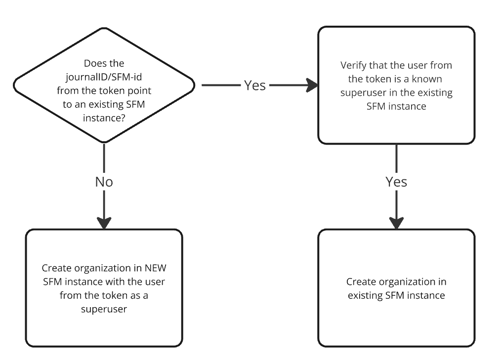
It is important that the EHR makes the functionality for creating organizations in SFM in a way that makes it easy for the superuser to understand the difference between creating a new organization as Option A vs Option B, and that they are aware of who should share data and who should not.
In both options, the organization is created with a journal-id/SFM-id that points to the correct Journal/instans in SFM.
HelseID preparations
The EHR system vendor prepares the system as a "client system" in HelseID self service, registering the consumption of SFM API in the profile. For `multi tenant` solutions, a multi tenant HelseID client system may be selected. The Client system will in this case also be a HelseID client.
It is important to understand the differences between the two variants:
Multi tenant client will request token with a specific `jounal-id`
Single tentant client will present a pre-configured `SFM-id`.
Create Organization
For a new customer (doctor's office new to SFM), the EHR superuser will create the organization element, using a token with a SFM-id or journal-id. 'Create' is the only allowed operation with an unknown id. The Create payload must be corresponding to identifiers in the token. If the validation of the payload is successful, SFM will create a new database schema, containning one Organization and one Person (Option A).
Important general advice for both testing and production:
do a search(GET) operation on the Organization endpoint to verify the expected result of not finding anything
do a Create (POST) operation with proper http headers and a FHIR payload with Organization profiled as sfm-Organization with the following properties:
Information needed for the Organization
- Organization.name
- Organization.Identifier[SFM-id] : matching the journal-id or SFM-id in token
- Organization.Identifier[ENH] : Organization matching the orgn_child in token if present, else the orgnr_parent
- Organization.Identifier[HERid] : Her id registered in Adresseregisteret for use in e-resept
- Organization.Type from the system: https://simplifier.net/r4medication/sfm-type-of-organization
- Organization.telecom with a simple dummy phone number in test
- Organization.address with a simle dummy address in test. Type should be "postal". If multiple address are included then SFM uses the first address in the list.
- Organization.extension.epjinfo shall be populated with info suitable for reporting to Reseptformidleren. Reseptformidleren will **reject the registration with an unknown systeminfo.systemcode**
- Organization.active = false: for now.
The operation takes some time to process as a new db-scheme is created at everything is set up in SFM before you get 2xx code and the organization structure in response. The new ID for this Organization is represented in the Location header.
You may now try to read back (GET) from Organization and verify that you get at bundle back with your Organization, now given an ID.
You may also try to read back from Person and verify that you are identified as an empty Person with your identifier. Note that in production we require that the next step is to update this Person instance with the correct name.
Example
In this example a new organisation Kolåsbakkane legekontor will be created using a new single tenant client (SFM-id not previously known by SFM). The EHR system creates a FHIR Organization payload with the essential properties, and selects active=false. Then this payload is POST-ed to the ./Organization endpoint:
    {
    "resourceType": "Organization",
    "meta": {
        "versionId": "1",
        "lastUpdated": "2024-05-23T15:33:58.7998213+02:00",
        "profile": [
        "http://ehelse.no/fhir/StructureDefinition/sfm-Organization"
        ]
    },
    "extension": [
        {
        "extension": [
            {
            "extension": [
                {
                "url": "systemcode",
                "valueString": "DrWho"
                },
                {
                "url": "systemname",
                "valueString": "Doctor Who testtool"
                },
                {
                "url": "version",
                "valueString": "4.1"
                },
                {
                "url": "updatetime",
                "valueDateTime": "2024-05-23T15:30:17.0349469+02:00"
                }
            ],
            "url": "systeminfo"
            },
            {
            "extension": [
                {
                "url": "servicevendorname",
                "valueString": "Kolåsen vedlikehald"
                },
                {
                "url": "contactname",
                "valueString": "Didrik"
                },
                {
                "url": "contactemail",
                "valueString": "didrik@kolaasen.no"
                },
                {
                "url": "contactphone",
                "valueString": "98765432"
                }
            ],
            "url": "operationsuplierinfo"
            }
        ],
        "url": "http://ehelse.no/fhir/StructureDefinition/sfm-epjinfo"
        }
    ],
    "identifier": [
        {
        "use": "official",
        "system": "urn:oid:2.16.578.1.12.4.1.4.101",
        "value": "917897468"
        },
        {
        "use": "official",
        "system": "urn:oid:2.16.578.1.12.4.1.2",
        "value": "81420690"
        },
        {
        "use": "official",
        "system": "urn:oid:2.16.578.1.12.4.1.4.109",
        "value": "a99abfb4-2bea-4e0a-bb03-38e37febbd2c"
        }
    ],
    "active": false,
    "type": [
        {
        "coding": [
            {
            "system": "http://ehelse.no/fhir/CodeSystem/sfm-type-of-organization",
            "code": "3",
            "display": "Fastlege"
            }
        ]
        }
    ],
    "name": "Kolåsbakkane legekontor",
    "telecom": [
        {
        "system": "phone",
        "value": "12345678",
        "use": "work"
        }
    ],
    "address": [
        {
        "use": "work",
        "type": "postal",
        "text": "Testaddress",
        "line": [
            "Testveien 1"
        ],
        "city": "Oslo",
        "postalCode": "1234"
        }
    ]
    }
The corresponding token used contains SFM-id and organization ID (orgnr_parent corresponding to Identifier [ENH]):
    {
    "iss": "https://helseid-sts.test.nhn.no",
    "nbf": 1716470965,
    "iat": 1716470965,
    "exp": 1716471565,
    "aud": "e-helse:sfm.api",
    "scope": [
        "openid",
        "profile",
        "helseid://scopes/identity/pid",
        "helseid://scopes/identity/security_level",
        "helseid://scopes/hpr/hpr_number",
        "helseid://scopes/identity/assurance_level",
        "e-helse:sfm.api/sfm.api"
    ],
    "amr": [
        "pwd"
    ],
    "client_id": "dc7ce5b5-670a-40f8-bd64-801e408b7069",
    "client_amr": "private_key_jwt",
    "helseid://claims/client/claims/orgnr_parent": "917897468",
    "sub": "tzto6gPhyTQw2bR/Wl0kgF/mTH+jdQoUBvaYSObfmlQ=",
    "auth_time": 1716470964,
    "idp": "testidp-oidc",
    "helseid://claims/identity/pid": "17056600574",
    "helseid://claims/identity/security_level": "4",
    "helseid://claims/identity/assurance_level": "high",
    "helseid://claims/hpr/hpr_number": "431001110",
    "oldsub": "gD6VTyxDgGoCCqOBFCuxuykX7tXL1jiWy0Zg9L0f96I=",
    "helseid://claims/client/amr": "rsa_private_key",
    "e-helse:sfm.api/client/claims/sfm-id": "a99abfb4-2bea-4e0a-bb03-38e37febbd2c",
    "helseid://claims/client/client_tenancy": "single-tenant",
    "sid": "150C9C961CBBF4F67138FA317E2B1C8D",
    "jti": "FC0B6D1EFB47D09A7B62A653B0469174"
    }
This operation takes some time as a new database schema is created, on success SFM replies a payload with an ID of the newly created Organization instance and http status 201 Created. The Organization returned now contains ID for further API access.
Person, the superuser
SFM has two types of users:
Superuser ( FHIR:Person )
Health person (FHIR: Practitioner)
In smaller installations (doctor's offices) some of the employees can be both types. Superusers can change the organization, create new health professionals and new superusers, but not access health data or patient information. Healthcare professionals can create patients, open a patient treatment portal and have access to health data in the API.
Example
When creating an organization, behind the scenes SFM also creates the minimal superuser represented by the line: "helseid://claims/identity/pid": "17056600574" in the token. Next natural step is to update this Person resource with proper name:
Do a GET to the ./Person endpoint and receive a search bundle containing one single person object:
    {
    "resourceType": "Bundle",
    "id": "8fd540ca-4e21-4a89-8d40-b8c3cd2598a6",
    "meta": {
        "lastUpdated": "2024-05-23T13:47:42.6275835+00:00"
    },
    "type": "searchset",
    "total": 1,
    "link": [
        {
        "relation": "self",
        "url": "http://base-fhir.test2.forskrivning.no/Person?_count=100&_format=json"
        }
    ],
    "entry": [
        {
        "fullUrl": "http://base-fhir.test2.forskrivning.no/Person/5a7d3824-11ac-4826-89b7-ddfdc9918bff",
        "resource": {
            "resourceType": "Person",
            "id": "5a7d3824-11ac-4826-89b7-ddfdc9918bff",
            "meta": {
            "lastUpdated": "2024-05-23T15:35:03.7386838+02:00",
            "profile": [
                "http://ehelse.no/fhir/StructureDefinition/sfm-Person"
            ]
            },
            "identifier": [
            {
                "use": "official",
                "system": "urn:oid:2.16.578.1.12.4.1.4.1",
                "value": "17056600574"
            }
            ],
            "active": true
        },
        "search": {
            "mode": "include"
        }
        }
    ]
    }
It is now possible to read the particular Person item by GET to endpoint ./Person/5a7d3824-11ac-4826-89b7-ddfdc9918bff
    {
    "resourceType": "Person",
    "id": "5a7d3824-11ac-4826-89b7-ddfdc9918bff",
    "meta": {
        "versionId": "1",
        "lastUpdated": "2024-05-23T15:35:03.7386838+02:00",
        "profile": [
        "http://ehelse.no/fhir/StructureDefinition/sfm-Person"
        ]
    },
    "identifier": [
        {
        "use": "official",
        "system": "urn:oid:2.16.578.1.12.4.1.4.1",
        "value": "17056600574"
        }
    ],
    "active": true
    }
This resource may now be updated with name and other properties by a PUT operation to Person endpoint with the id:
./Person/5a7d3824-11ac-4826-89b7-ddfdc9918bff
    {
    "resourceType": "Person",
    "id": "5a7d3824-11ac-4826-89b7-ddfdc9918bff",
    "meta": {
        "versionId": "1",
        "lastUpdated": "2024-05-23T15:35:03.7386838+02:00",
        "profile": [
        "http://ehelse.no/fhir/StructureDefinition/sfm-Person"
        ]
    },
    "identifier": [
        {
        "use": "official",
        "system": "urn:oid:2.16.578.1.12.4.1.4.1",
        "value": "17056600574"
        }
    ],
    "name": [
        {
        "extension": [
            {
            "url": "http://hl7.no/fhir/StructureDefinition/no-basis-middlename",
            "valueString": "D"
            }
        ],
        "family": "Didrikson",
        "given": [
            "Didrik"
        ]
        }
    ],
    "gender": "male",
    "birthDate": "1966-05-17",
    "address": [
        {
        "use": "work",
        "type": "physical",
        "line": [
            "Testveien 1"
        ],
        "city": "Oslo",
        "postalCode": "1234"
        }
    ],

    "active": true
    }
SFM will respond http status 200
To allow other users into this instance of SFM, the superuser may now use HelseID to create other superusers, and Practitioners.
Practitioner - the healtcare user
Lets say that this superuser also is a doctor in this instance, a practitioner may be created:
    {
    "resourceType": "Practitioner",
    "meta": {
        "versionId": "1",
        "lastUpdated": "2024-05-23T15:58:11.8597674+02:00",
        "profile": [
        "http://ehelse.no/fhir/StructureDefinition/sfm-Practitioner"
        ]
    },
    "identifier": [
        {
        "use": "official",
        "system": "urn:oid:2.16.578.1.12.4.1.4.1",
        "value": "17056600574"
        }
    ],
    "active": true,
    "name": [
        {
        "extension": [
            {
            "url": "http://hl7.no/fhir/StructureDefinition/no-basis-middlename",
            "valueString": "D"
            }
        ],
        "family": "Dirdrikson",
        "given": [
            "Didrik"
        ]
        }
    ],
    "address": [
        {
        "use": "work",
        "type": "physical",
        "line": [
            "Testveien 1"
        ],
        "city": "Oslo",
        "postalCode": "1234"
        }
    ],
    "gender": "male",
    "birthDate": "1966-05-17"
    }
SFM responds http 201 Created and the new resource as a Practitioner.
Patient
Example of how to create a patient in SFM:
{
  "resourceType": "Patient",
  "meta": {
    "profile": [
      "http://ehelse.no/fhir/StructureDefinition/sfm-Patient"
    ]
  },
  "identifier": [
    {
      "use": "official",
      "system": "urn:oid:2.16.578.1.12.4.1.4.1",
      "value": "08902098314"
    },
    {
      "use": "official",
      "system": "urn:oid:2.16.578.1.12.4.1.4.14",
      "value": "c74c510c-7898-4414-82d1-4d805043cbb4"
    }
  ],
  "active": true,
  "name": [
    {
      "family": "Pusekatt",
      "given": [
        "Varm"
      ]
    }
  ],
  "gender": "male",
  "birthDate": "2020-10-08",
  "address": [
    {
      "use": "home",
      "type": "physical",
      "line": [
        "Testveien 1"
      ],
      "city": "Oslo",
      "postalCode": "1234"
    }
  ]
}
SFM will respond http status 201
"system": "urn:oid:2.16.578.1.12.4.1.4.1" = FNR
"system": "urn:oid:2.16.578.1.12.4.1.4.2" = DNR
"system": "urn:oid:2.16.578.1.12.4.1.4.14" = xxx-id
When updating a patient with a new pid, the old pid must be sent with use=old and the new pid with use=official in the PUT request to SFM. If only the new pid is included in the PUT request, SFM will return an error.
See also integration requirements for SFM for how to handle patient update: https://e-resept.atlassian.net/wiki/spaces/SFMDOK/pages/2160492843/Krav+til+integrasjon+med+SFM+Fullversjon
Note on Practitioner in SFM Basis
In SFM basis there is an option to create practitioners "dynamically" on first access with a valid token. Instead of having to create all sfm-Practitioners upfront, SFM will then automatically sync to Helsepersonellregisteret, where SFM retrieves necessary information on the Practitioners by looking up the pid from the token for new/unknown users. This option needs to configured in agreement with NHN.